Search widget
This documentation applies to version 2.X of the plugin.The search widget will be helpful if you want to maximize the space available on your page.
It has two functionalities: it redirects you to the first calendar found or it redirects you to the search page (with the dates you are looking for already selected)where you can see a list with all the calendars available for the selected period. You can search only for days or only for the hours of a single day.
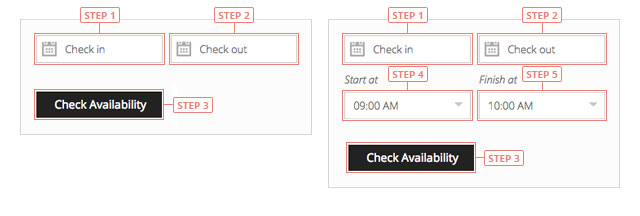
Step 1Click to select the check-in day.Step 2Click to select the check-out day.Step 3Click to search for availability.Step 4Click to select the starting hour of your reservation.Step 5Click to select the ending hour of your reservation.
It's necessary to have the same day as check-in and check-out when you are searching for hours.