Search widget

This documentation applies to version 2.X of the plugin.

Sökwidgeten är till stor hjälp om du vill maximera det tillgängliga utrymmet på din sida.

Den har två funktioner: den omdirigerar dig till den första kalender som hittas eller den omdirigerar dig till söksidan (med de datum du letar efter redan valda) där du kan se en lista med alla tillgängliga kalendrar för den valda perioden. Du kan söka endast efter dagar eller endast efter timmar för en enskild dag.
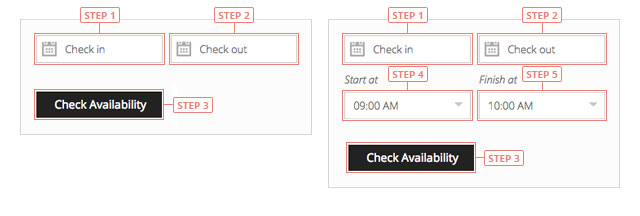
Search widget
Step 1Klicka för att välja incheckningsdag.Step 2Klicka för att välja utcheckningsdag.Step 3Click to search for availability.Step 4Click to select the starting hour of your reservation.Step 5Click to select the ending hour of your reservation.

Det är nödvändigt att ha samma dag som incheckning och utcheckning när du söker efter timmar.

Cookies & Privacy We use cookies to improve your experience, remember your preferences, and understand how the site is used. Enable or disable non-essential cookies Google Analytics
Select your language

Please pick your language, by clicking it, in the list below.

Please pick your language, by tapping it, in the list below.


Our shop If you are interested in our products visit our shop to view the offers.

Log in to your account Enter your email & password.


or login with


Are you new here? Register now Forgot your password? Reset it
Log in to your account
You are being logged in ...
Log in to your account
Error Oops! Incorrect email or password.

Try again to log in
Log in to your account
Error Oops! Your account has been banned.

Try again to log in
Create an account Enter the email for your account. It can not be changed.

By clicking on "Create an account" below, you are agreeing to the Terms & Conditions and Privacy Policy.


or login with


Already have an account? Log in Forgot your password? Reset it
Create an account
You are being registered ...
Create an account
Error Oops! The email is already used.

Try again to register
Create an account
Error Oops! The email is invalid.

Try again to register
Create an account
Success Congratulations! Your account has been created. A message with your password has been sent to your email address. Please verify your Inbox or Spam folder.

Log in
Reset password Enter your account email.
Instructions with how to reset your password will be sent to it.


Already have an account? Log in Are you new here? Register now
Reset password
We are sending the email ...
Create an account
Error Oops! The email doesn't exist.

Try again to reset the password
Reset password
Success An email has been sent with reset instructions.
Close Start to accept bookings Shop Log in | Register Site navigation Change language Go top