Søg i widget

This documentation applies to version 2.X of the plugin.

Søgewidgeten er nyttig, hvis du vil maksimere den plads, der er til rådighed på din side.

Den har to funktioner: Den omdirigerer dig til den første kalender, du finder, eller den omdirigerer dig til søgesiden (med de datoer, du leder efter, allerede valgt), hvor du kan se en liste med alle de kalendere, der er tilgængelige for den valgte periode. Du kan kun søge efter dage eller kun efter timerne på en enkelt dag.
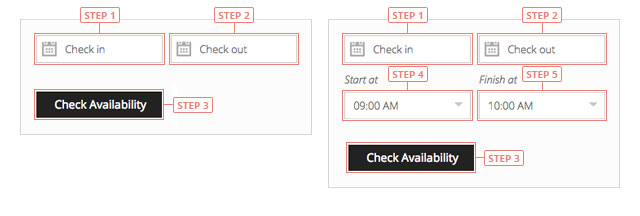
Søg i widget
Step 1Klik for at vælge check-in-dag.Step 2Klik for at vælge udcheckningsdag.Step 3Klik for at søge efter tilgængelighed.Step 4Klik for at vælge starttidspunktet for din reservation.Step 5Klik for at vælge sluttidspunktet for din reservation.

Det er nødvendigt at have samme dag som check-in og check-out, når du søger efter timer.

Cookies & Privacy We use cookies to improve your experience, remember your preferences, and understand how the site is used. Enable or disable non-essential cookies Google Analytics
Select your language

Please pick your language, by clicking it, in the list below.

Please pick your language, by tapping it, in the list below.


Our shop If you are interested in our products visit our shop to view the offers.

Log in to your account Enter your email & password.


or login with


Are you new here? Register now Forgot your password? Reset it
Log in to your account
You are being logged in ...
Log in to your account
Error Oops! Incorrect email or password.

Try again to log in
Log in to your account
Error Oops! Your account has been banned.

Try again to log in
Create an account Enter the email for your account. It can not be changed.

By clicking on "Create an account" below, you are agreeing to the Terms & Conditions and Privacy Policy.


or login with


Already have an account? Log in Forgot your password? Reset it
Create an account
You are being registered ...
Create an account
Error Oops! The email is already used.

Try again to register
Create an account
Error Oops! The email is invalid.

Try again to register
Create an account
Success Congratulations! Your account has been created. A message with your password has been sent to your email address. Please verify your Inbox or Spam folder.

Log in
Reset password Enter your account email.
Instructions with how to reset your password will be sent to it.


Already have an account? Log in Are you new here? Register now
Reset password
We are sending the email ...
Create an account
Error Oops! The email doesn't exist.

Try again to reset the password
Reset password
Success An email has been sent with reset instructions.
Close Start to accept bookings Shop Log in | Register Site navigation Change language Go top