Administration - Taxes & fees
Path / Administration areaTaxes & fees This documentation applies to version 2.X of the plugin.Add taxes & fees
Step 1Click the button to add a new Tax or fee form.
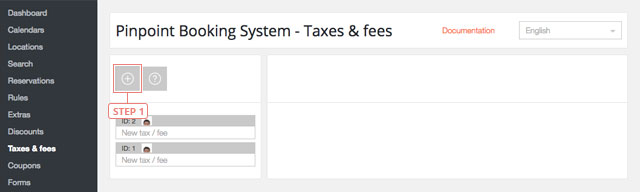
Set taxes & fees
Step 1Click the tax/fee to display the information.
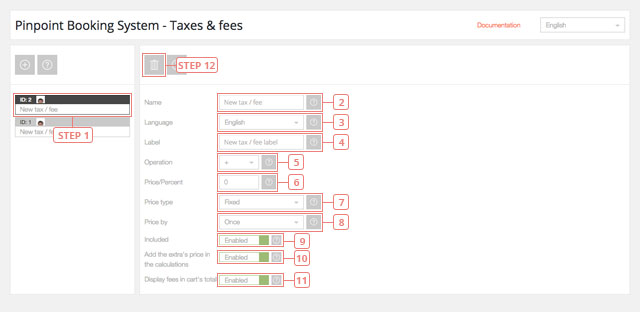
Field 2Change the name for the new tax/fee.Field 3Select the language for the tax/fee form.Field 4Change the label name for the tax/fee.Field 5Select the type of the tax/fee operation.Field 6Set the price.Field 7Select the type of price, Fixed or Percent.Field 8Select how the price is applied, Once or Per day/hour.Field 9Default value is Enabled. Set if the Tax/fee price is Included in the price.Field 10Default value is Enabled. Set if the Extra prices be added in the calculations.Field 11Default value is Enabled. Set if the Fees be displayed in the cart total.Button 12Delete tax/fee