Administration - Locations

Path / Administration areaLocations This documentation applies to version 2.X of the plugin.

In this back end section you can create locations on a Google map, and add calendars to it. Each location can have multiple calendars which is ideal for business models that need to create more of them.

A location will display in Search Google map results if the assigned calendars are available.


Add a location

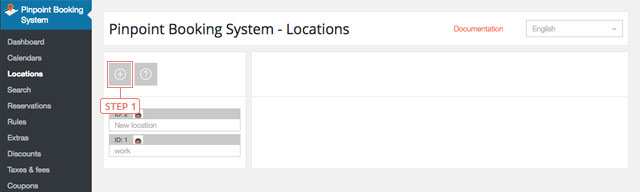
Step 1Click the "plus" button to add a new location.
Add a location

After you clicked the button, the location will appear in the list below.


Set location data

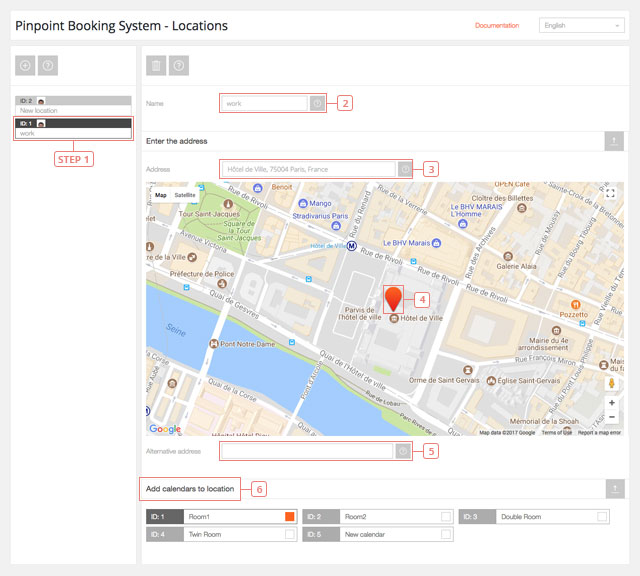
Step 1Select the location from the list to display the data.
Set location data
Field 2Change name.Field 3Enter the address of the location. Google maps API will display hints depending on what you insert.Item 4You can drag the marker on the map to point the exact location and to select the address.Field 5If Google maps API does not display the correct address, but the marker is in the right position, you can enter manually the address you want to display.Item 6Select the calendars that will be available at this location.
Select your language

Please pick your language, by clicking it, in the list below.

Please pick your language, by tapping it, in the list below.


Our shop If you are interested in our products visit our shop to view the offers.

Log in to your account Enter your email & password.


or login with


Are you new here? Register now Forgot your password? Reset it
Log in to your account
You are being logged in ...
Log in to your account
Error Oops! Incorrect email or password.

Try again to log in
Log in to your account
Error Oops! Your account has been banned.

Try again to log in
Create an account Enter the email for your account. It can not be changed.

By clicking on "Create an account" below, you are agreeing to the Terms & Conditions and Privacy Policy.


or login with


Already have an account? Log in Forgot your password? Reset it
Create an account
You are being registered ...
Create an account
Error Oops! The email is already used.

Try again to register
Create an account
Error Oops! The email is invalid.

Try again to register
Create an account
Success Congratulations! Your account has been created. A message with your password has been sent to your email address. Please verify your Inbox or Spam folder.

Log in
Reset password Enter your account email.
Instructions with how to reset your password will be sent to it.


Already have an account? Log in Are you new here? Register now
Reset password
We are sending the email ...
Create an account
Error Oops! The email doesn't exist.

Try again to reset the password
Reset password
Success An email has been sent with reset instructions.
Close Start to accept bookings Shop Log in | Register Site navigation Change language Go top