Administracja - rabaty
Ścieżka / Obszar administracyjnyRabaty Niniejsza dokumentacja dotyczy wersji 2.X wtyczki.Ustaw wartości rabatów, gdy klient rezerwuje określoną liczbę dni/godzin.
Musisz wybrać zniżki, których chcesz użyć w ustawieniach kalendarza. Te same zniżki mogą być używane w nieograniczonej liczbie kalendarzy.
Dodaj rabat
Krok 1Kliknij przycisk "plus", aby dodać nowy rabat.
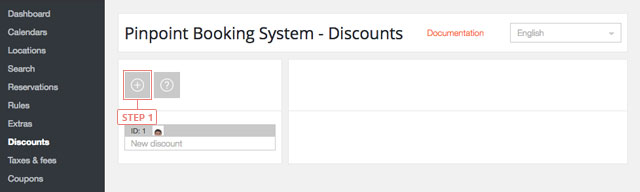
Po kliknięciu przycisku rabat pojawi się na poniższej liście.
Ustaw rabat
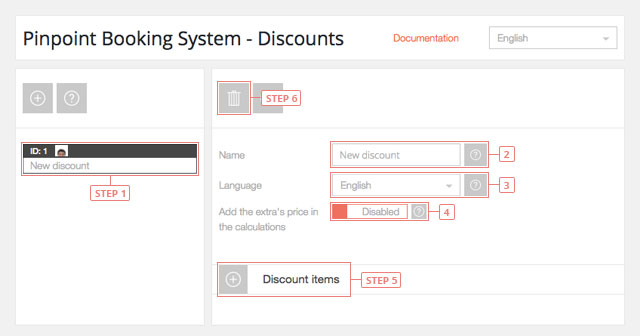
Krok 1 Wybierz rabat z listy, aby wyświetlić informacje.Pole 2Zmień nazwęPole 3Przejdź do języka, w którym chcesz edytować rabat.Pole 4Dodaj cenę dodatków w obliczeniach - domyślnie wyłączonePrzycisk 5Dodaj pozycję rabatowąPrzycisk 6Usuń zniżkę
Ustawianie pozycji rabatu
Element discount zawiera dane dla zarezerwowanego upływu czasu.
Kolejność elementów określa priorytet użytkowania. Ostatni element ma wyższy priorytet.
Przycisk 1Przełączanie ustawień elementuPrzycisk 2Usuń elementPrzycisk 3Sortuj element
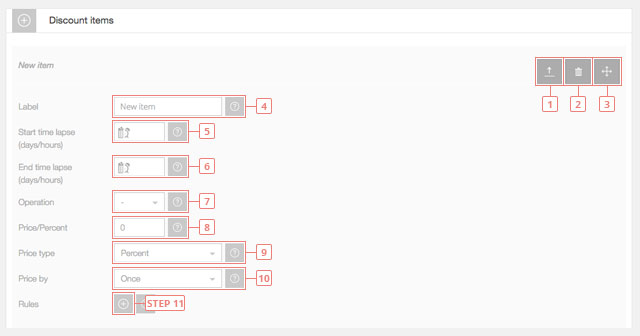
Pole 4Wprowadź etykietę przedmiotu (będzie widoczna dla klientów).Pole 5Wprowadź liczbę dni/godzin dla początku upływu czasu. Pozostaw to pole puste, aby rozpocząć od 1 dnia/godziny. Jeśli zastosujesz to do kalendarza, który używa dni, będzie to oznaczać dni, jeśli używasz godzin w kalendarzu, będzie to oznaczać godziny.Pole 6Wprowadź liczbę dni/godzin zakończenia upływu czasu. Pozostaw to pole puste, aby było nieograniczone.Pole 7Wybierz operację ceny elementu. Można dodać lub odjąć wartość.Pole 8Wprowadź cenę przedmiotu.Pole 9Wybierz typ ceny pozycji. Może to być stała wartość lub procent od ceny.Pole 10Wybierz cenę przedmiotu według. Cena może być obliczona jednorazowo lub według dnia/godziny.Przycisk 11Dodaj regułę pozycji rabatowej.
Ustaw regułę pozycji rabatowej
Reguła discount item ustawia rabaty dla określonego okresu czasu.
Kolejność reguł określa priorytet ich użycia. Ostatnia reguła ma wyższy priorytet. Reguła nadpisuje również dane elementu.
Przycisk 1Usuń regułę.Przycisk 2Zasada sortowania.
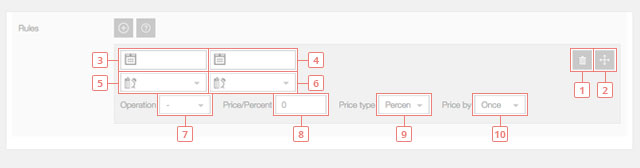
Pole 3Wprowadź datę rozpoczęcia reguły, kiedy reguła pozycji rabatowej zacznie być używana. Pozostaw to pole puste, aby rozpocząć od dzisiaj.Pole 4Wprowadź datę końcową reguły, kiedy reguła pozycji rabatowej przestanie być używana. Pozostaw puste, jeśli nie chcesz mieć daty końcowej.Pole 5Wprowadź godzinę rozpoczęcia reguły, kiedy reguła pozycji rabatowej zacznie być używana. Pozostaw to pole puste, aby reguła była stosowana od początku dnia.Pole 6Wprowadź godzinę zakończenia reguły, kiedy reguła pozycji rabatowej przestanie być używana. Pozostaw puste, aby reguła wygasła na koniec dnia.Pole 7Wybierz operację ceny reguły. Można dodać lub odjąć wartość.Pole 8Wprowadź cenę regułyPole 9Wybierz typ ceny reguły. Może to być stała wartość lub procent od ceny.Pole 10Wybierz cenę reguły według. Cena może być obliczana jednorazowo lub według dnia/godziny.