アドミニストレーション - 割引

Path / 管理エリアDiscounts This documentation applies to version 2.X of the plugin.

クライアントが特定の日数/時間を予約している場合、割引値を設定します。

カレンダー設定で使用したい割引を選択する必要があります。同じ割引を無制限にカレンダーで使用できます。


割引を追加する

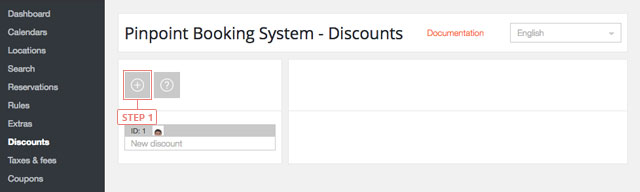
Step 1新しい割引を追加するには、"plus"ボタンをクリックしてください。
割引を追加する

ボタンをクリックすると、割引が下のリストに表示されます。


割引の設定

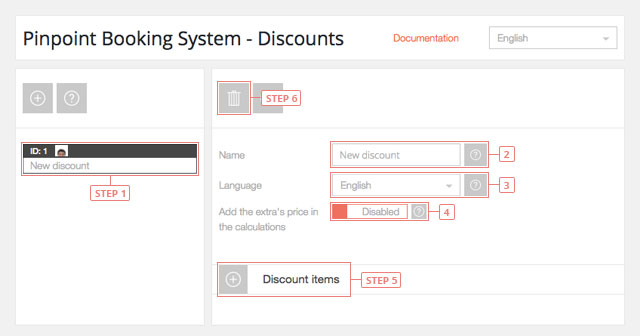
Step 1リストから割引を選択すると、情報が表示されます。フィールド 2名称変更フィールド 3割引を編集したい言語に変更する。フィールド 4エキストラ価格を計算に加える - デフォルトでは無効ボタン 5割引商品の追加ボタン 6割引の削除
割引の設定

割引項目の設定

割引項目には、予約された時間経過のデータが含まれています。

項目の順番は使用優先度を示す。最後の項目の優先順位が高い。

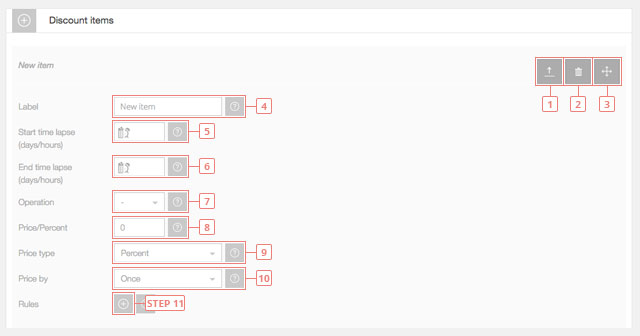
ボタン 1項目の設定を切り替えるボタン 2アイテムの削除ボタン 3ソート項目
割引項目の設定
フィールド 4アイテムラベルを入力します。フィールド 5タイムラプスを開始する日数/時間を入力します。1日/時間から開始する場合は空白のままにしてください。カレンダーで「日」を使用している場合は「日」、「時間」を使用している場合は「時間」となります。フィールド 6タイムラプス終了までの日数/時間を入力します。無制限の場合は空欄にしてください。フィールド 7商品価格の操作を選択します。値を加算または減算することができます。フィールド 8商品価格を入力してください。フィールド 9アイテムの価格タイプを選択します。固定値または価格からのパーセンテージを指定できます。フィールド 10アイテム価格を選択します。価格は1回または日/時間ごとに計算することができます。ボタン 11割引アイテムのルールを追加します。

割引アイテムのルールを設定する

割引項目ルールは、特定の期間の割引を設定します。

ルールの順番は使用優先度を与える。最後のルールがより高い優先度を持つ。また、ルールはアイテムのデータを上書きします。

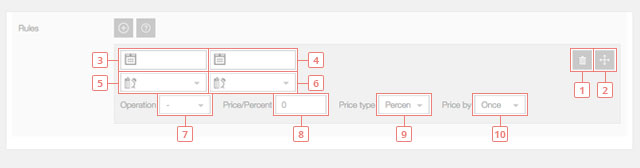
ボタン 1ルールを削除する。ボタン 2ソートルール。
割引アイテムのルールを設定する
フィールド 3割引項目ルールの使用開始日を入力します。今日から開始する場合は空白のままにしてください。フィールド 4ルールの終了日(割引アイテムのルールが使用されなくなる日)を入力します。終了日を設けたくない場合は空白のままにしてください。フィールド 5ルール開始時間を入力します。空白のままにしておくと、その日の開始時刻からルールが開始されます。フィールド 6ルール終了時間を入力します。空白のままにしておくと、その日の終わりにルールが失効します。フィールド 7ルール価格操作を選択します。値を加算または減算することができます。フィールド 8ルール価格の入力フィールド 9ルールの価格タイプを選択する。固定値または価格からのパーセンテージを指定できます。フィールド 10ルール価格を選択します。価格は1回または日/時間ごとに計算することができます。
Cookies & Privacy We use cookies to improve your experience, remember your preferences, and understand how the site is used. Enable or disable non-essential cookies Google Analytics
Select your language

Please pick your language, by clicking it, in the list below.

Please pick your language, by tapping it, in the list below.


Our shop If you are interested in our products visit our shop to view the offers.

Log in to your account Enter your email & password.


or login with


Are you new here? Register now Forgot your password? Reset it
Log in to your account
You are being logged in ...
Log in to your account
Error Oops! Incorrect email or password.

Try again to log in
Log in to your account
Error Oops! Your account has been banned.

Try again to log in
Create an account Enter the email for your account. It can not be changed.

By clicking on "Create an account" below, you are agreeing to the Terms & Conditions and Privacy Policy.


or login with


Already have an account? Log in Forgot your password? Reset it
Create an account
You are being registered ...
Create an account
Error Oops! The email is already used.

Try again to register
Create an account
Error Oops! The email is invalid.

Try again to register
Create an account
Success Congratulations! Your account has been created. A message with your password has been sent to your email address. Please verify your Inbox or Spam folder.

Log in
Reset password Enter your account email.
Instructions with how to reset your password will be sent to it.


Already have an account? Log in Are you new here? Register now
Reset password
We are sending the email ...
Create an account
Error Oops! The email doesn't exist.

Try again to reset the password
Reset password
Success An email has been sent with reset instructions.
Close Start to accept bookings Shop Log in | Register Site navigation Change language Go top