アドミニストレーション - エキストラ

Path / 管理エリアExtras This documentation applies to version 2.X of the plugin.

予約リクエストに追加できるエクストラ&サービスを設定します。これは予約リクエストに追加したいアメニティやサービス等を作成するのに使用します。

カレンダー設定で使用したいエクストラ&サービスを選択する必要があります。同じエクストラ&サービスは無制限にカレンダーで使用できます。

デフォルトでは、Peopleというエクストラが作成され、予約の大人と子供の人数を管理します。


追加サービス

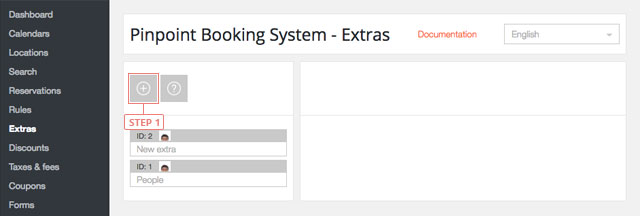
Step 1プラス "ボタンをクリックし、新しいエキストラやサービスを追加する。
追加サービス

ボタンをクリックすると、エキストラが下のリストに表示されます。


セット・エキストラ&サービス・データ

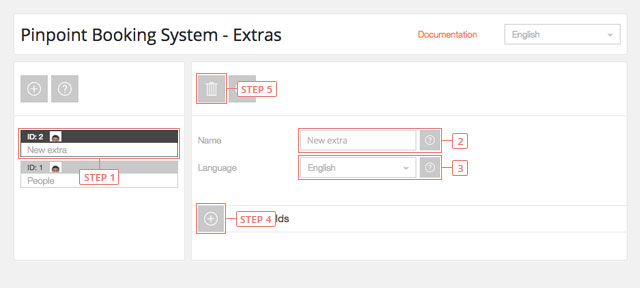
Step 1リストのエキストラボタンをクリックすると、エキストラの設定が表示されます。フィールド 2エクストラ & サービス名を変更する。フィールド 3エキストラ&サービスの言語を選択します。ボタン 4プラスボタンをクリックして、新しいエキストラグループを追加します。ボタン 5現在のエクストラデータを削除する。
セット・エキストラ&サービス・データ

エキストラ・フィールドの設定

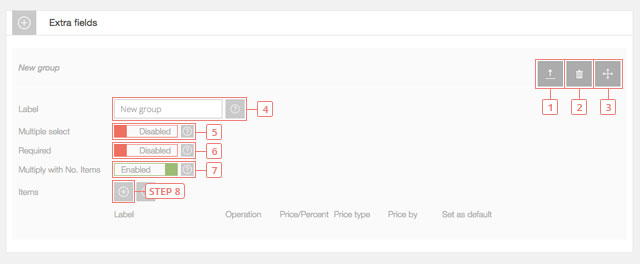
ボタン 1設定を隠すをクリックします。ボタン 2Extrasフィールドを削除するをクリックします。ボタン 3クリックしてドラッグし、Extrasフィールドを並べ替える。
エキストラ・フィールドの設定
フィールド 4Extrasグループの名前を変更する。フィールド 5デフォルトは「無効」です。Extrasグループから複数のオプションを選択したい場合は、このオプションを有効にしてください。フィールド 6デフォルトは「無効」です。このExtrasグループからの選択を必須にしたい場合は有効にしてください。フィールド 7有効がデフォルト値です。フロントエンドカレンダーで予約されたアイテムの数にエクストラを掛けたくない場合は無効にしてください。ボタン 8ボタンをクリックして、Extrasグループにアイテムを追加します。

新しい項目を設定する

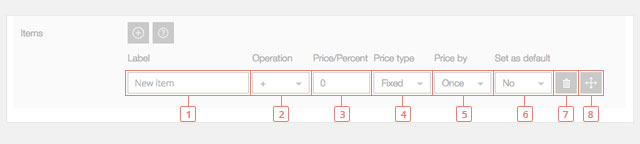
フィールド 1新しいアイテムのラベルを変更します。フィールド 2適用したい操作の種類を選択します。フィールド 3商品の価格を設定します。フィールド 4価格の種類を選択します:固定またはパーセントフィールド 5価格の適用方法を選択してください:1回」または「1日/1時間ごとフィールド 6デフォルト設定
新しい項目を設定する
ボタン 7項目を削除します。ボタン 8クリック&ドラッグで余分な項目を並べ替える

重要なお知らせエクストラ・セクションからの選択は、1日/1時間の選択で利用可能な合計数から利用可能数を差し引くものではありません。
Cookies & Privacy We use cookies to improve your experience, remember your preferences, and understand how the site is used. Enable or disable non-essential cookies Google Analytics
Select your language

Please pick your language, by clicking it, in the list below.

Please pick your language, by tapping it, in the list below.


Our shop If you are interested in our products visit our shop to view the offers.

Log in to your account Enter your email & password.


or login with


Are you new here? Register now Forgot your password? Reset it
Log in to your account
You are being logged in ...
Log in to your account
Error Oops! Incorrect email or password.

Try again to log in
Log in to your account
Error Oops! Your account has been banned.

Try again to log in
Create an account Enter the email for your account. It can not be changed.

By clicking on "Create an account" below, you are agreeing to the Terms & Conditions and Privacy Policy.


or login with


Already have an account? Log in Forgot your password? Reset it
Create an account
You are being registered ...
Create an account
Error Oops! The email is already used.

Try again to register
Create an account
Error Oops! The email is invalid.

Try again to register
Create an account
Success Congratulations! Your account has been created. A message with your password has been sent to your email address. Please verify your Inbox or Spam folder.

Log in
Reset password Enter your account email.
Instructions with how to reset your password will be sent to it.


Already have an account? Log in Are you new here? Register now
Reset password
We are sending the email ...
Create an account
Error Oops! The email doesn't exist.

Try again to reset the password
Reset password
Success An email has been sent with reset instructions.
Close Start to accept bookings Shop Log in | Register Site navigation Change language Go top