Administracja - Kupony

Path / Obszar administracyjnyCoupons This documentation applies to version 2.X of the plugin.

Skonfiguruj kupony/vouchery dla klientów do wykorzystania podczas dokonywania rezerwacji.

Musisz wybrać kupon, którego chcesz użyć w ustawieniach kalendarza. Ten sam kupon może być użyty w nieograniczonej liczbie kalendarzy. Do tego samego kalendarza można dodać wiele kuponów.


Dodaj kupon

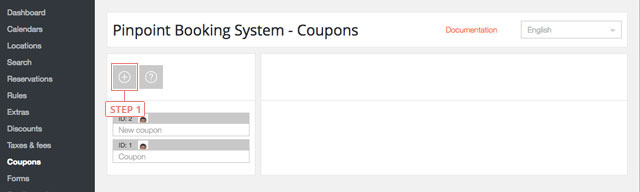
Step 1Kliknij przycisk "plus", aby dodać nowy kupon.
Dodaj kupon

Po kliknięciu przycisku kupon pojawi się na poniższej liście.


Ustawianie danych kuponu

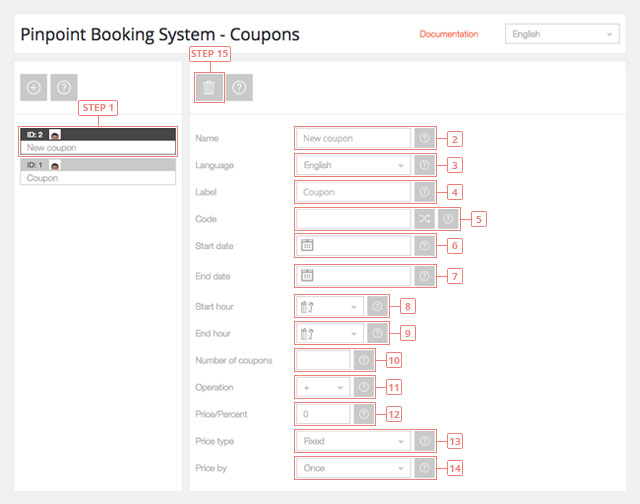
Step 1Wybierz kupon z listy, aby wyświetlić informacje.
Ustawianie danych kuponu
Field 2Zmień nazwę kuponu.Field 3Przejdź do języka, w którym chcesz edytować kupon.Field 4Wprowadź etykietę kuponu. Będzie ona widoczna dla klientów.Field 5Wprowadź kod kuponu. Masz możliwość wygenerowania losowego kodu.Field 6Wprowadź datę rozpoczęcia kuponu, kiedy kupon zacznie być wykorzystywany. Pozostaw to pole puste, aby rozpocząć od dzisiaj.Field 7Wprowadź datę zakończenia kuponu, kiedy kupon straci ważność. Pozostaw to pole puste, jeśli kupony mają nieograniczony czas ważności.Field 8Wprowadź godzinę rozpoczęcia kuponu, kiedy kupon zacznie być wykorzystywany. Pozostaw to pole puste, aby móc korzystać z kuponów od początku dnia.Field 9Wprowadź godzinę zakończenia kuponu, kiedy kupon przestanie być używany. Pozostaw to pole puste, aby móc korzystać z kuponów do końca dnia.Field 10Wprowadź liczbę dostępnych kuponów. W przypadku nieograniczonej liczby kuponów pozostaw to pole puste.Field 11Wybierz operację ceny kuponu. Możesz dodać lub odjąć wartość.Field 12Wprowadź cenę kuponu.Field 13Wybierz typ ceny kuponu. Może to być stała wartość lub procent od ceny.Field 14Wybierz sposób zastosowania kuponu. Cena może być obliczana jednorazowo lub według dnia/godziny.Button 15Usuń kupon.
Cookies & Privacy We use cookies to improve your experience, remember your preferences, and understand how the site is used. Enable or disable non-essential cookies Google Analytics
Select your language

Please pick your language, by clicking it, in the list below.

Please pick your language, by tapping it, in the list below.


Our shop If you are interested in our products visit our shop to view the offers.

Log in to your account Enter your email & password.


or login with


Are you new here? Register now Forgot your password? Reset it
Log in to your account
You are being logged in ...
Log in to your account
Error Oops! Incorrect email or password.

Try again to log in
Log in to your account
Error Oops! Your account has been banned.

Try again to log in
Create an account Enter the email for your account. It can not be changed.

By clicking on "Create an account" below, you are agreeing to the Terms & Conditions and Privacy Policy.


or login with


Already have an account? Log in Forgot your password? Reset it
Create an account
You are being registered ...
Create an account
Error Oops! The email is already used.

Try again to register
Create an account
Error Oops! The email is invalid.

Try again to register
Create an account
Success Congratulations! Your account has been created. A message with your password has been sent to your email address. Please verify your Inbox or Spam folder.

Log in
Reset password Enter your account email.
Instructions with how to reset your password will be sent to it.


Already have an account? Log in Are you new here? Register now
Reset password
We are sending the email ...
Create an account
Error Oops! The email doesn't exist.

Try again to reset the password
Reset password
Success An email has been sent with reset instructions.
Close Start to accept bookings Shop Log in | Register Site navigation Change language Go top