관리 - 설정

Path / 관리 영역설정 This documentation applies to version 2.X of the plugin.

일반 설정

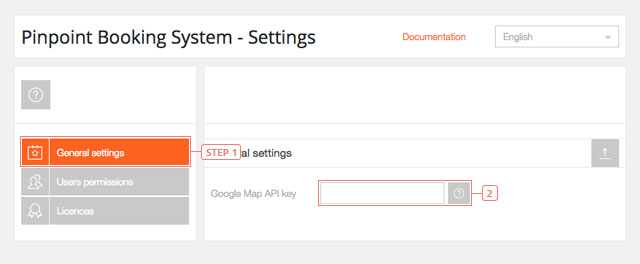
단계 1‘일반 설정’을 선택하세요분야 2Google 지도 API 키를 입력하세요
일반 설정

사용자 권한

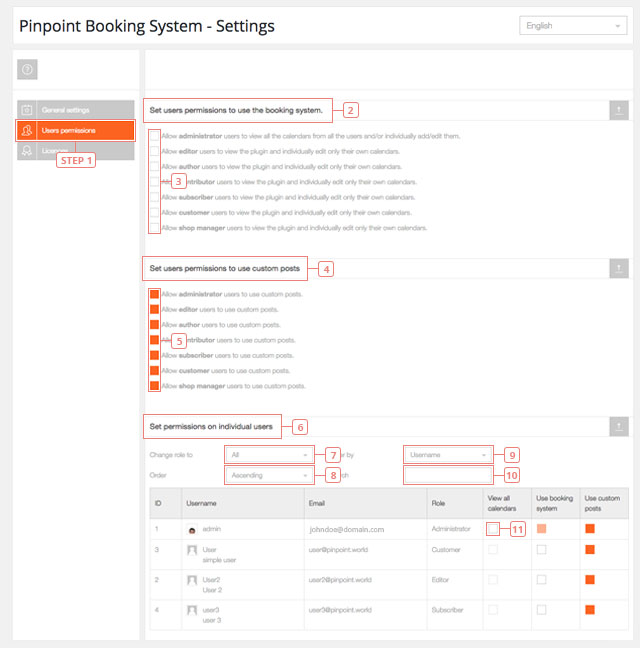
단계 1사용자 권한. 클릭하여 플러그인 사용 권한을 관리하세요.항목 2예약 시스템을 사용할 수 있도록 사용자 권한을 설정하세요. 여기에서 웹사이트의 각 사용자 유형에 대한 권한을 관리할 수 있습니다.항목 3기본값: 선택 해제됨. 각 옵션을 클릭하여 다양한 사용자에게 예약 시스템 사용 권한을 부여하십시오.항목 4사용자가 사용자 정의 게시물을 사용할 수 있도록 권한을 설정하세요. 여기에서 웹사이트의 각 사용자 유형별로 사용자 정의 게시물을 작성할 수 있는 권한을 관리할 수 있습니다.항목 5기본값: 선택됨. 기본적으로 모든 사용자에게는 핀포인트 게시물 작성 권한이 부여됩니다. 이 권한을 취소하려면 이 옵션을 비활성화하십시오.항목 6개별 사용자에 대한 권한 설정. 여기에서 각 사용자의 개별 권한을 관리할 수 있습니다.분야 7역할별로 사용자를 필터링합니다.분야 8사용자 목록의 정렬 옵션을 설정합니다.분야 9사용자를 정렬할 방법을 선택하세요(ID, 이메일 또는 사용자 이름으로 정렬할 수 있습니다).분야 10사용자 이름을 직접 입력할 수 있는 검색 창입니다.분야 11클릭하여 관리자에게 모든 캘린더와 예약 내역을 볼 수 있는 권한을 부여하세요.
사용자 권한

모든 사용자는 사용자 정의 게시물을 사용할 권한이 있습니다. 모든 캘린더를 볼 수 있는 권한은 관리자에게만 부여됩니다.


라이선스

웹사이트에서 활성화되어 있는 모든 라이선스 목록입니다. 애드온 라이선스도 여기에 포함되어 있습니다.

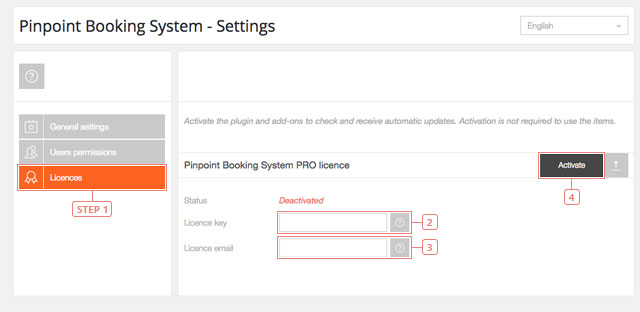
단계 1라이선스를 클릭하면 라이선스 설정이 표시됩니다.분야 2계정에 등록된 유효한 라이선스 키를 %s에 입력하세요.분야 3%sPINPOINT.WORLD 계정%s에 연결된 이메일 주소를 입력하세요.버튼 4라이선스를 활성화하려면 클릭하세요. 라이선스가 활성화되면 성공 메시지가 표시됩니다.
라이선스

플러그인이 작동하는 데는 라이선스 활성화가 필요하지 않지만, 업데이트를 받으려면 활성화가 필요합니다.

Cookies & Privacy We use cookies to improve your experience, remember your preferences, and understand how the site is used. Enable or disable non-essential cookies Google Analytics
Select your language

Please pick your language, by clicking it, in the list below.

Please pick your language, by tapping it, in the list below.


Our shop If you are interested in our products visit our shop to view the offers.

Log in to your account Enter your email & password.


or login with


Are you new here? Register now Forgot your password? Reset it
Log in to your account
You are being logged in ...
Log in to your account
Error Oops! Incorrect email or password.

Try again to log in
Log in to your account
Error Oops! Your account has been banned.

Try again to log in
Create an account Enter the email for your account. It can not be changed.

By clicking on "Create an account" below, you are agreeing to the Terms & Conditions and Privacy Policy.


or login with


Already have an account? Log in Forgot your password? Reset it
Create an account
You are being registered ...
Create an account
Error Oops! The email is already used.

Try again to register
Create an account
Error Oops! The email is invalid.

Try again to register
Create an account
Success Congratulations! Your account has been created. A message with your password has been sent to your email address. Please verify your Inbox or Spam folder.

Log in
Reset password Enter your account email.
Instructions with how to reset your password will be sent to it.


Already have an account? Log in Are you new here? Register now
Reset password
We are sending the email ...
Create an account
Error Oops! The email doesn't exist.

Try again to reset the password
Reset password
Success An email has been sent with reset instructions.
Close Start to accept bookings Shop Log in | Register Site navigation Change language Go top